|
|
本帖最后由 yakeyun 于 2026-2-10 13:56 编辑
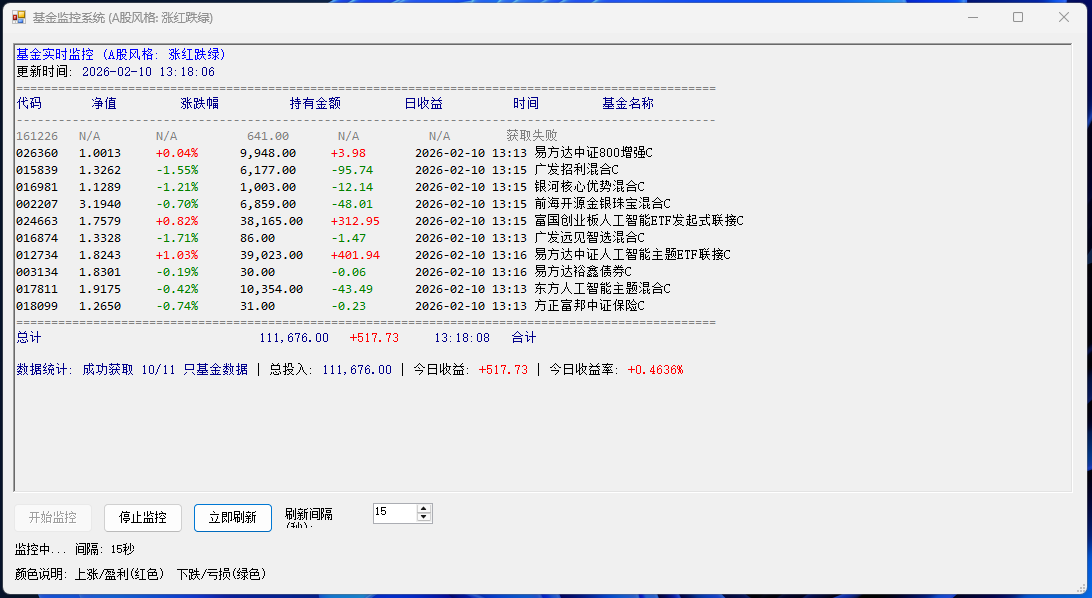
可以通过“# 基金配置”里面的信息来添加自己的持有信息,等号左边是数字代码,右边是持有金额。预估金额每天相差出入比较少,默认自动15秒刷新一次。- # 简化版基金监控GUI(A股风格:上涨红色,下跌绿色)- 优化显示格式
- # 文件名: SimpleFundMonitorGUI_AStockStyle_Optimized.ps1
- Add-Type -AssemblyName System.Windows.Forms
- Add-Type -AssemblyName System.Drawing
- # 基金配置
- $fundConfig = @{
- "012734" = 39023
- "026360" = 9948
- "018099" = 31
- "015839" = 6177
- "161226" = 641
- "017811" = 10354
- "002207" = 6859
- "016981" = 1003
- "024663" = 38165
- "016874" = 86
- "003134" = 30
- }
- # 全局变量
- $timer = $null
- $isMonitoring = $false
- # 创建主窗体
- $form = New-Object System.Windows.Forms.Form
- $form.Text = "基金监控系统 (A股风格: 涨红跌绿)"
- $form.Size = New-Object System.Drawing.Size(1100, 600) # 增加宽度
- $form.StartPosition = "CenterScreen"
- # 创建RichTextBox显示结果(支持彩色文本)
- $richTextBox = New-Object System.Windows.Forms.RichTextBox
- $richTextBox.Location = New-Object System.Drawing.Point(10, 10)
- $richTextBox.Size = New-Object System.Drawing.Size(1060, 450) # 增加高度
- $richTextBox.Multiline = $true
- $richTextBox.ScrollBars = "Vertical"
- $richTextBox.Font = New-Object System.Drawing.Font("Consolas", 10)
- $richTextBox.ReadOnly = $true
- $richTextBox.BackColor = [System.Drawing.Color]::FromArgb(240, 240, 240)
- $richTextBox.WordWrap = $false # 禁用自动换行
- # 控制按钮
- $startButton = New-Object System.Windows.Forms.Button
- $startButton.Location = New-Object System.Drawing.Point(10, 470)
- $startButton.Size = New-Object System.Drawing.Size(80, 30)
- $startButton.Text = "开始监控"
- $stopButton = New-Object System.Windows.Forms.Button
- $stopButton.Location = New-Object System.Drawing.Point(100, 470)
- $stopButton.Size = New-Object System.Drawing.Size(80, 30)
- $stopButton.Text = "停止监控"
- $stopButton.Enabled = $false
- $refreshButton = New-Object System.Windows.Forms.Button
- $refreshButton.Location = New-Object System.Drawing.Point(190, 470)
- $refreshButton.Size = New-Object System.Drawing.Size(80, 30)
- $refreshButton.Text = "立即刷新"
- # 刷新间隔设置
- $intervalLabel = New-Object System.Windows.Forms.Label
- $intervalLabel.Location = New-Object System.Drawing.Point(280, 475)
- $intervalLabel.Size = New-Object System.Drawing.Size(80, 20)
- $intervalLabel.Text = "刷新间隔(秒):"
- $intervalNumeric = New-Object System.Windows.Forms.NumericUpDown
- $intervalNumeric.Location = New-Object System.Drawing.Point(370, 470)
- $intervalNumeric.Size = New-Object System.Drawing.Size(60, 20)
- $intervalNumeric.Value = 15
- $intervalNumeric.Minimum = 5
- $intervalNumeric.Maximum = 3600
- # 状态标签
- $statusLabel = New-Object System.Windows.Forms.Label
- $statusLabel.Location = New-Object System.Drawing.Point(10, 510)
- $statusLabel.Size = New-Object System.Drawing.Size(500, 20)
- $statusLabel.Text = "就绪 - 点击'开始监控'按钮启动自动刷新"
- # 添加说明标签
- $infoLabel = New-Object System.Windows.Forms.Label
- $infoLabel.Location = New-Object System.Drawing.Point(10, 535)
- $infoLabel.Size = New-Object System.Drawing.Size(500, 20)
- $infoLabel.Text = "颜色说明: 上涨/盈利(红色) 下跌/亏损(绿色)"
- # 添加控件
- $form.Controls.Add($richTextBox)
- $form.Controls.Add($startButton)
- $form.Controls.Add($stopButton)
- $form.Controls.Add($refreshButton)
- $form.Controls.Add($intervalLabel)
- $form.Controls.Add($intervalNumeric)
- $form.Controls.Add($statusLabel)
- $form.Controls.Add($infoLabel)
- # 简化的数据获取函数
- function Get-SimpleFundData {
- param([string]$FundCode)
-
- try {
- # 使用多个备选数据源
- $urls = @(
- "http://fundgz.1234567.com.cn/js/${FundCode}.js", # 天天基金
- "http://api.fund.eastmoney.com/f10/lsjz?fundCode=${FundCode}&pageIndex=1" # 东方财富
- )
-
- foreach ($url in $urls) {
- try {
- $webClient = New-Object System.Net.WebClient
- $webClient.Encoding = [System.Text.Encoding]::UTF8
- $webClient.Headers.Add("User-Agent", "Mozilla/5.0 (Windows NT 10.0; Win64; x64) AppleWebKit/537.36")
- $response = $webClient.DownloadString($url)
-
- # 尝试解析天天基金格式
- if ($response -match 'jsonpgz\((.+)\)') {
- $jsonStr = $matches[1]
-
- try {
- $fundInfo = $jsonStr | ConvertFrom-Json
-
- return @{
- Name = $fundInfo.name
- NetValue = [decimal]$fundInfo.dwjz
- ChangeRate = [decimal]$fundInfo.gszzl
- Time = $fundInfo.gztime
- }
- }
- catch {
- # 如果ConvertFrom-Json失败,使用正则解析
- if ($jsonStr -match '"name":"([^"]+)".*"dwjz":"([^"]+)".*"gszzl":"([^"]+)"') {
- $name = $matches[1]
- $dwjz = [decimal]$matches[2]
- $gszzl = [decimal]$matches[3]
-
- return @{
- Name = $name
- NetValue = $dwjz
- ChangeRate = $gszzl
- Time = (Get-Date -Format "HH:mm")
- }
- }
- }
- }
- }
- catch {
- # 尝试下一个URL
- continue
- }
- }
- }
- catch {
- Write-Verbose "获取基金数据失败: $FundCode"
- }
-
- return $null
- }
- # 添加彩色文本到RichTextBox
- function Add-ColoredText {
- param(
- [string]$Text,
- [System.Drawing.Color]$Color = [System.Drawing.Color]::Black
- )
-
- $richTextBox.SelectionStart = $richTextBox.TextLength
- $richTextBox.SelectionLength = 0
- $richTextBox.SelectionColor = $Color
- $richTextBox.AppendText($Text)
- $richTextBox.SelectionColor = $richTextBox.ForeColor
- }
- # 更新显示(优化格式:将名称放到最后)
- function Update-Display {
- $statusLabel.Text = "正在更新数据..."
- $form.Refresh()
-
- # 清空文本框
- $richTextBox.Clear()
-
- # 添加标题
- Add-ColoredText "基金实时监控 (A股风格: 涨红跌绿)`r`n" ([System.Drawing.Color]::Blue)
- Add-ColoredText "更新时间: " ([System.Drawing.Color]::Black)
- Add-ColoredText ((Get-Date -Format "yyyy-MM-dd HH:mm:ss") + "`r`n") ([System.Drawing.Color]::DarkBlue)
-
- # 添加分隔线
- $separatorLine = "".PadRight(100, "=")
- Add-ColoredText ($separatorLine + "`r`n") ([System.Drawing.Color]::Gray)
-
- # 添加表头(将名称放到最后一列)
- $header = "{0,-8} {1,-10} {2,-12} {3,-12} {4,-12} {5,-10} {6,-30}`r`n" -f
- "代码", "净值", "涨跌幅", "持有金额", "日收益", "时间", "基金名称"
-
- Add-ColoredText $header ([System.Drawing.Color]::DarkBlue)
-
- # 添加表头分隔线
- $headerSeparator = "".PadRight(100, "-")
- Add-ColoredText ($headerSeparator + "`r`n") ([System.Drawing.Color]::Gray)
-
- $totalInvest = 0
- $totalEarnings = 0
- $successCount = 0
-
- # 处理每只基金
- foreach ($fund in $fundConfig.GetEnumerator()) {
- $data = Get-SimpleFundData -FundCode $fund.Key
-
- if ($data) {
- $dailyEarnings = [math]::Round($fund.Value * ($data.ChangeRate / 100), 2)
-
- # A股风格颜色:上涨红色,下跌绿色
- $changeColor = if ($data.ChangeRate -ge 0) {
- [System.Drawing.Color]::Red # 上涨用红色
- } else {
- [System.Drawing.Color]::Green # 下跌用绿色
- }
-
- $earningsColor = if ($dailyEarnings -ge 0) {
- [System.Drawing.Color]::Red # 盈利用红色
- } else {
- [System.Drawing.Color]::Green # 亏损用绿色
- }
-
- # 添加基金代码(黑色)
- $linePart1 = "{0,-8} " -f $fund.Key
- Add-ColoredText $linePart1 ([System.Drawing.Color]::Black)
-
- # 添加净值(黑色)
- $linePart2 = "{0,-10:N4} " -f $data.NetValue
- Add-ColoredText $linePart2 ([System.Drawing.Color]::Black)
-
- # 添加涨跌幅(A股风格彩色)
- $changeSymbol = if ($data.ChangeRate -ge 0) { "+" } else { "" }
- $changeText = "$changeSymbol$($data.ChangeRate.ToString('N2'))%"
- $linePart3 = "{0,-12}" -f $changeText
- Add-ColoredText $linePart3 $changeColor
-
- # 添加持有金额(黑色)
- $linePart4 = "{0,-12:N2} " -f $fund.Value
- Add-ColoredText $linePart4 ([System.Drawing.Color]::Black)
-
- # 添加日收益(A股风格彩色)
- $earningsSymbol = if ($dailyEarnings -ge 0) { "+" } else { "" }
- $earningsText = "$earningsSymbol$($dailyEarnings.ToString('N2'))"
- $linePart5 = "{0,-12}" -f $earningsText
- Add-ColoredText $linePart5 $earningsColor
-
- # 添加时间(黑色)
- $linePart6 = "{0,-10} " -f $data.Time
- Add-ColoredText $linePart6 ([System.Drawing.Color]::Black)
-
|
评分
-
查看全部评分
|


 发表于 2026-2-10 13:55:01