|
|
楼主 |
发表于 2022-9-11 19:31:54
|
显示全部楼层
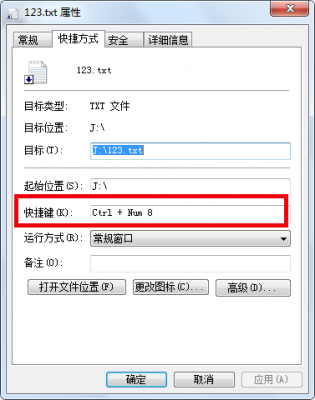
用vbs解决了问题:
'【翻译(好)】【先设置快捷键为:"CTRL+Alt+9",再设置快捷键为:"CTRL+Alt+1"】
Set WshShell = WScript.CreateObject("WScript.Shell")
set oShellLink = WshShell.CreateShortcut("D:\桌面\Desktop\翻译搜狗OCR手写\翻译(好)Ctrl + Alt + 1.lnk") '快捷方式路径
oShellLink.TargetPath = "D:\1绿色软件\翻译工具\翻译(好)\启动--翻译(好).vbs" '可执行文件的路径
oShellLink.WindowStyle = 1 '运行方式(窗体打开的方式)
oShellLink.Hotkey = "CTRL+Alt+9" '快捷键
oShellLink.IconLocation = "D:\1绿色软件\翻译工具\翻译(好)\翻译(好).exe, 0" '图标(可不指定)
oShellLink.Description = "ChinaDforce YanMang" '备注信息
oShellLink.WorkingDirectory = "D:\1绿色软件\翻译工具\翻译(好)\" '文件所在目录
oShellLink.Save '保存快捷方式
Set WshShell = WScript.CreateObject("WScript.Shell")
set oShellLink = WshShell.CreateShortcut("D:\桌面\Desktop\翻译搜狗OCR手写\翻译(好)Ctrl + Alt + 1.lnk") '快捷方式路径
oShellLink.TargetPath = "D:\1绿色软件\翻译工具\翻译(好)\启动--翻译(好).vbs" '可执行文件的路径
oShellLink.WindowStyle = 1 '运行方式(窗体打开的方式)
oShellLink.Hotkey = "CTRL+Alt+1" '快捷键
oShellLink.IconLocation = "D:\1绿色软件\翻译工具\翻译(好)\翻译(好).exe, 0" '图标(可不指定)
oShellLink.Description = "ChinaDforce YanMang" '备注信息
oShellLink.WorkingDirectory = "D:\1绿色软件\翻译工具\翻译(好)\" '文件所在目录
oShellLink.Save '保存快捷方式
'********************************************************************************************************************
'【搜狗OCR 】【先设置快捷键为:"CTRL+Alt+9",再设置快捷键为:"CTRL+Alt+2"】
Set WshShell = WScript.CreateObject("WScript.Shell")
set oShellLink = WshShell.CreateShortcut("D:\桌面\Desktop\翻译搜狗OCR手写\搜狗OCR Ctrl + Alt + 2.lnk") '快捷方式路径
oShellLink.TargetPath = "D:\1绿色软件\多媒体\抓图抓滚动\搜狗拼音截图\screencapture.exe" '可执行文件的路径
oShellLink.WindowStyle = 1 '运行方式(窗体打开的方式)
oShellLink.Hotkey = "CTRL+Alt+9" '快捷键
oShellLink.IconLocation = "D:\搜狗拼音便携版\SogouPinyinPortable.exe, 0" '图标(可不指定)
oShellLink.Description = "ChinaDforce YanMang" '备注信息
oShellLink.WorkingDirectory = "D:\1绿色软件\多媒体\抓图抓滚动\搜狗拼音截图\" '文件所在目录
oShellLink.Save '保存快捷方式
Set WshShell = WScript.CreateObject("WScript.Shell")
set oShellLink = WshShell.CreateShortcut("D:\桌面\Desktop\翻译搜狗OCR手写\搜狗OCR Ctrl + Alt + 2.lnk") '快捷方式路径
oShellLink.TargetPath = "D:\1绿色软件\多媒体\抓图抓滚动\搜狗拼音截图\screencapture.exe" '可执行文件的路径
oShellLink.WindowStyle = 1 '运行方式(窗体打开的方式)
oShellLink.Hotkey = "CTRL+Alt+2" '快捷键
oShellLink.IconLocation = "D:\搜狗拼音便携版\SogouPinyinPortable.exe, 0" '图标(可不指定)
oShellLink.Description = "ChinaDforce YanMang" '备注信息
oShellLink.WorkingDirectory = "D:\1绿色软件\多媒体\抓图抓滚动\搜狗拼音截图\" '文件所在目录
oShellLink.Save '保存快捷方式
'********************************************************************************************************************
'【手写输入】【先设置快捷键为:"CTRL+Alt+9",再设置快捷键为:"CTRL+Alt+3"】
Set WshShell = WScript.CreateObject("WScript.Shell")
set oShellLink = WshShell.CreateShortcut("D:\桌面\Desktop\翻译搜狗OCR手写\手写输入Ctrl + Alt + 3.lnk") '快捷方式路径
oShellLink.TargetPath = "D:\搜狗拼音便携版\App\SogouExtension\handinput\1.1.0.38\handinput.exe" '可执行文件的路径
oShellLink.WindowStyle = 1 '运行方式(窗体打开的方式)
oShellLink.Hotkey = "CTRL+Alt+9" '快捷键
'oShellLink.IconLocation = "D:\搜狗拼音便携版\App\SogouExtension\handinput\1.1.0.38\翻译(好).exe, 0" '图标(可不指定)
oShellLink.Description = "ChinaDforce YanMang" '备注信息
oShellLink.WorkingDirectory = "D:\搜狗拼音便携版\App\SogouExtension\handinput\1.1.0.38\" '文件所在目录
oShellLink.Save '保存快捷方式
Set WshShell = WScript.CreateObject("WScript.Shell")
set oShellLink = WshShell.CreateShortcut("D:\桌面\Desktop\翻译搜狗OCR手写\手写输入Ctrl + Alt + 3.lnk") '快捷方式路径
oShellLink.TargetPath = "D:\搜狗拼音便携版\App\SogouExtension\handinput\1.1.0.38\handinput.exe" '可执行文件的路径
oShellLink.WindowStyle = 1 '运行方式(窗体打开的方式)
oShellLink.Hotkey = "CTRL+Alt+3" '快捷键
'oShellLink.IconLocation = "D:\搜狗拼音便携版\App\SogouExtension\handinput\1.1.0.38\翻译(好).exe, 0" '图标(可不指定)
oShellLink.Description = "ChinaDforce YanMang" '备注信息
oShellLink.WorkingDirectory = "D:\搜狗拼音便携版\App\SogouExtension\handinput\1.1.0.38\" '文件所在目录
oShellLink.Save '保存快捷方式 |
|


 发表于 2022-9-9 22:23:21