找回密码
 注册
搜索
[新手上路]批处理新手入门导读[视频教程]批处理基础视频教程[视频教程]VBS基础视频教程[批处理精品]批处理版照片整理器
[批处理精品]纯批处理备份&还原驱动[批处理精品]CMD命令50条不能说的秘密[在线下载]第三方命令行工具[在线帮助]VBScript / JScript 在线参考
查看: 175678|回复: 59

[文件操作] 求exiftool程序的下载

[复制链接]
发表于 2024-4-20 18:05:39 | 显示全部楼层 |阅读模式
求exiftool.exe程序的下载
发表于 2024-4-20 18:55:39 | 显示全部楼层
 楼主| 发表于 2024-4-20 20:33:17 | 显示全部楼层
回复 2# hfxiang


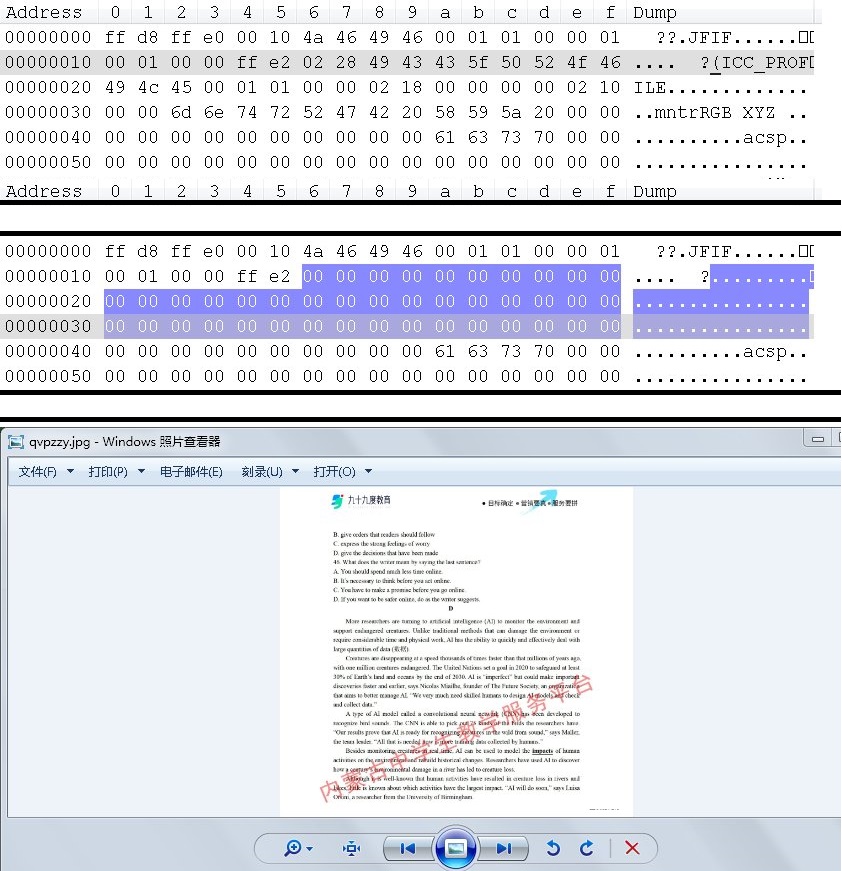
微信公众号下载的jpg文件,有一些在windows照片查看器中无法打开,其原因是内嵌了ICC文件。解决办法很简单,不需要改windows颜色配置的方法:
首先,去http://exiftool.org下载个免费的命令行程序exiftool.exe
建一个批处理文件Remove-icc.bat,用记事本编辑输入:exiftool -icc_profile= *.jpg 。
将exiftool.exe和Remove-icc.bat都放在需要更改的微信图片目录下,运行Remove-icc.bat,目录里面原jpg内嵌的icc文件都会被去除,并生成一个新的同名jpg。原jpg会自动更名为jpg_original文件,没有内嵌icc的jpg完全不影响。
按类型排序,删掉所有jpg_original文件,搞定收工。


上面这个情况,按照上面的方法为什么无效?
发表于 2024-4-21 09:05:36 | 显示全部楼层
回复 3# wh123wh123


    请选一个“微信公众号下载的jpg文件,在windows照片查看器中无法打开”这样的图片上传到网盘,以便大家测试。
 楼主| 发表于 2024-4-21 16:27:03 | 显示全部楼层
本帖最后由 wh123wh123 于 2024-4-21 16:30 编辑

回复 4# Batcher


把图片右键保存到电脑,然后点击图片看能不能直接打开显示?看是什么原因导致无法正常显示的,期待原因和最佳解决办法
发表于 2024-4-21 18:23:35 | 显示全部楼层
回复 5# wh123wh123


  1. https://exiftool.org/exiftool-12.83.zip
复制代码
用这个
发表于 2024-4-21 18:24:24 | 显示全部楼层
就是icc , 原本打不开的 , 填充icc信息就能打开了
请确保你确实是移除了icc (3楼那)

发表于 2024-4-21 20:25:23 | 显示全部楼层
回复 3# wh123wh123

RemoveICCfromJPG.ps1
  1. Add-Type -AssemblyName System.Drawing
  2. $cp = New-Object CodeDom.Compiler.CompilerParameters
  3. $cp.ReferencedAssemblies.Add([Reflection.Assembly]::GetAssembly([Drawing.Image]).Location) >$null
  4. $cp.CompilerOptions ='/unsafe'
  5. Add-Type -CompilerParameters $cp -TypeDefinition @"
  6. using System;
  7. using System.Drawing;
  8. using System.Drawing.Imaging;
  9. using System.IO;

  10. public class ImageProcessor
  11. {
  12.     public static void RemoveICCProfile(string imagePath)
  13.     {
  14.         string tempPath = Path.GetTempFileName();

  15.         using (Image image = Image.FromFile(imagePath))
  16.         {
  17.             if (image.PropertyItems.Length > 0)
  18.             {
  19.                 foreach (PropertyItem propertyItem in image.PropertyItems)
  20.                 {
  21.                     if (propertyItem.Id == 0x8773)
  22.                     {
  23.                         image.RemovePropertyItem(propertyItem.Id);
  24.                     }
  25.                 }
  26.             }

  27.             image.Save(tempPath, ImageFormat.Jpeg);
  28.         }

  29.         File.Delete(imagePath);
  30.         File.Move(tempPath, imagePath);
  31.     }
  32. }
  33. "@

  34. dir *.jpg | ForEach-Object {
  35.     [ImageProcessor]::RemoveICCProfile($_.FullName)
  36. }
复制代码
发表于 2024-4-21 21:27:48 | 显示全部楼层
回复 8# buyiyang

Add-Type -AssemblyName System.Drawing
这个POWERSHELL直接就可以了吧
 楼主| 发表于 2024-4-21 21:39:14 | 显示全部楼层
回复 6# 77七


@echo off
exiftool -icc_profile= *.jpg
pause

    'exiftool' 不是内部或外部命令
或批处理文件。
请按任意键继续. . .
这是咋回事?
发表于 2024-4-21 21:42:59 | 显示全部楼层
回复 10# wh123wh123


把exe文件复制出来或者写exe的完整路径

评分

参与人数 1技术 +1 收起 理由
wh123wh123 + 1 非常感谢老师帮助

查看全部评分

 楼主| 发表于 2024-4-21 21:44:11 | 显示全部楼层
回复 9# terse


    用BAT或者VBS能不能解决?上面代码看不懂
 楼主| 发表于 2024-4-21 21:47:19 | 显示全部楼层
回复 11# 77七


    哦,是需要修改文件名才行,.jpg_original这个文件是什么?可以删除吗?如何顺便让批处理删除掉?求个完整地批处理代码,期待老师
发表于 2024-4-21 21:53:15 | 显示全部楼层
回复 9# terse


    ISE才可以
发表于 2024-4-21 21:55:55 | 显示全部楼层
回复 13# wh123wh123


  1. @echo off
  2. cd /d "%~dp0"
  3. set "_exiftool=D:\exiftool-12.83\exiftool(-k).exe"
  4. "%_exiftool%" -icc_profile= *.jpg
  5. del "*jpg_original"
  6. pause
复制代码
您需要登录后才可以回帖 登录 | 注册

本版积分规则

Archiver|手机版|小黑屋|批处理之家 ( 渝ICP备10000708号 )

GMT+8, 2026-3-17 07:06 , Processed in 0.024171 second(s), 9 queries , File On.

Powered by Discuz! X3.5

© 2001-2026 Discuz! Team.

快速回复 返回顶部 返回列表